Why AI Can Dream Up a Scene - But Can't Design
Elad Hirsch, Purvanshi Mehta
10 mins
Jan 29, 2026


tl;dr Current AI models excel at generating artistic imagery but fail at basic professional design tasks, like moving a logo or swapping a font, because they "redraw" entire images rather than preserving existing structure. This limitation stems from treating design as pixel prediction rather than a system of strict rules involving layout, typography, and brand identity. To create a true design co-pilot, we must build models that master core design pillars, enabling precise generation and iterative editing.
"A designer at Airbnb needs to update 50 ad variations. Change one color. Should take 5 minutes. With current AI tools, it takes 4 hours of manual work."
There’s a strange paradox in today’s Creative AI landscape. Give GPT-5 or Gemini a prompt like “generate a cyberpunk cityscape at sunset,” and you’ll get something genuinely impressive. Moody lighting, intricate detail, the works.
But ask that same model to take an existing graphic, a presentation slide, an ad, a landing page, and make a precise design edit: make the headline bigger, keep the layout identical, shift an element by two pixels, swap blue for our brand orange, or use a custom font.
Everything breaks.
Tasks that were trivial in yesterday’s design workflows suddenly become impossible for today’s most advanced models?

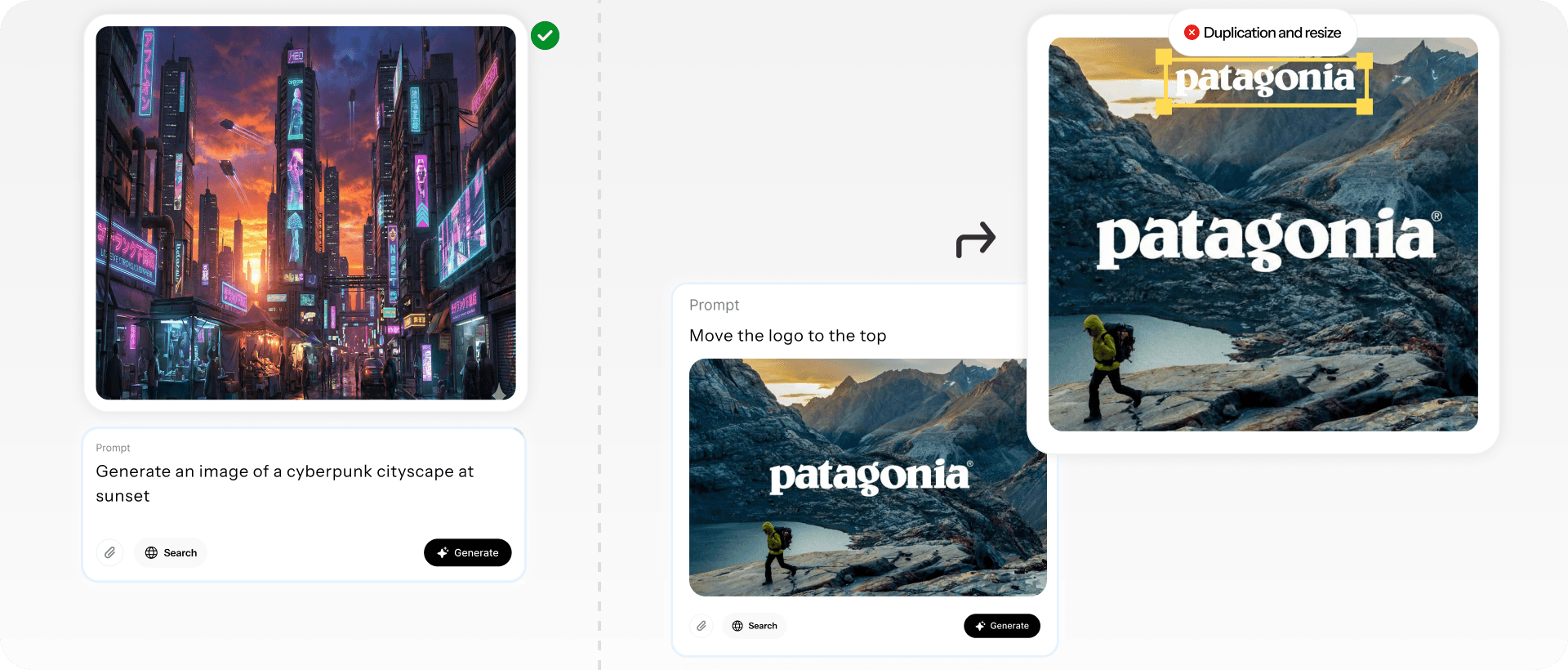
Figure 1: When asked to generate an image of a cyberpunk cityscape at sunset, Gemini produces a visually stunning result (left). However, when given a simple landscape poster featuring the Patagonia logo and instructed to move the logo upward, it fails to perform the requested edit, instead copying and downscaling the text (right).
The Mismatch Between Diffusion Models and Graphic Design
Current models treat design as a one-shot art generation problem, not as the collaborative, iterative craft it actually is. Design is in the iterations.
Pixel-level models see a flat image. Structure-aware models see the decisions that created it - and can make new decisions that honor the same principles. That's the difference between a tool that generates pretty pictures and a copilot that understands design intent.
The assumption of treating graphic design as scene generation has two fundamental problems:
Hard Constraints - First, they cannot enforce hard design constraints, even when those constraints are simple. If a designer wants a specific font, exact typography, or a fixed text layer, diffusion models can only approximate it. The output may look similar, but the rule itself is never enforced.
Constraints such as “use this font” or “do not regenerate this layer” are currently treated as probabilistic instructions rather than hard rules. Models that represent structure and layers can instead enforce these constraints exactly, by freezing components or applying precise vector edits (e.g., aligning text boxes) without regenerating the full image. This yields more reliable control while reducing computation, latency, and cost.
Redrawing vs. Editing - Second, editing becomes guided regeneration. Instead of modifying a specific element, the model redraws the entire design. Layout, hierarchy, spacing, and typography are re-inferred rather than preserved, making precise edits impossible.
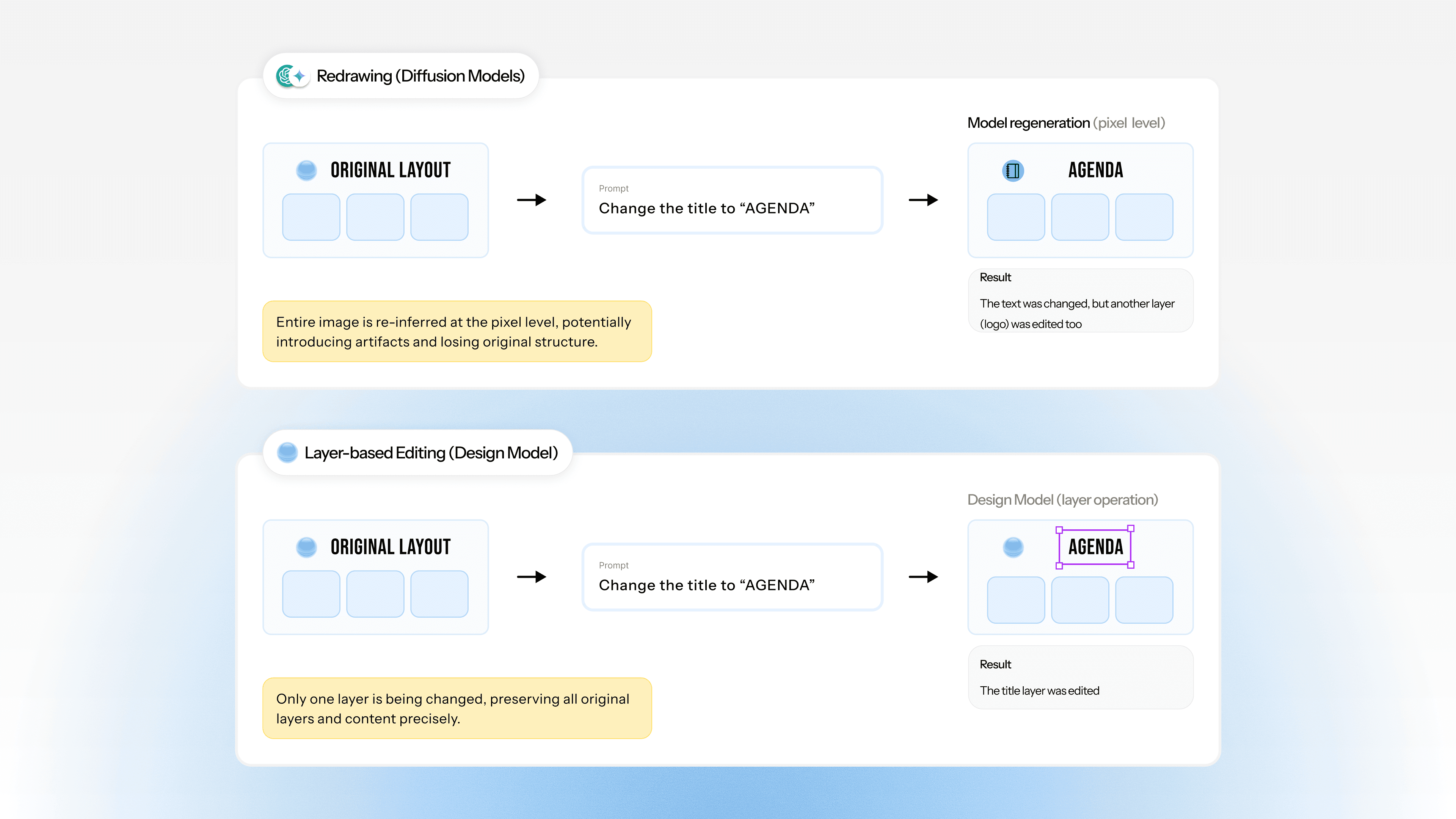
Figure 2: When instructed to change the title, the diffusion model (top) redraws the entire canvas, often introducing undesired artifacts like changing a logo to suit the new text, whereas the design model (bottom) treats the request as a structural edit, separately editing the relevant layer and preserving the original typography and layout exactly.
Fundamentals of Design Pillars
If we want to build a AI Design co-pilot, we need models that understand design language. Not natural language that happens to describe design, but the actual vocabulary and rules that govern how visual communication works.
To rigorously evaluate a model’s design sense, we decompose it into five fundamental pillars. These five pillars capture the irreducible, non-overlapping capabilities required for professional design, making design sense measurable beyond surface-level aesthetics.
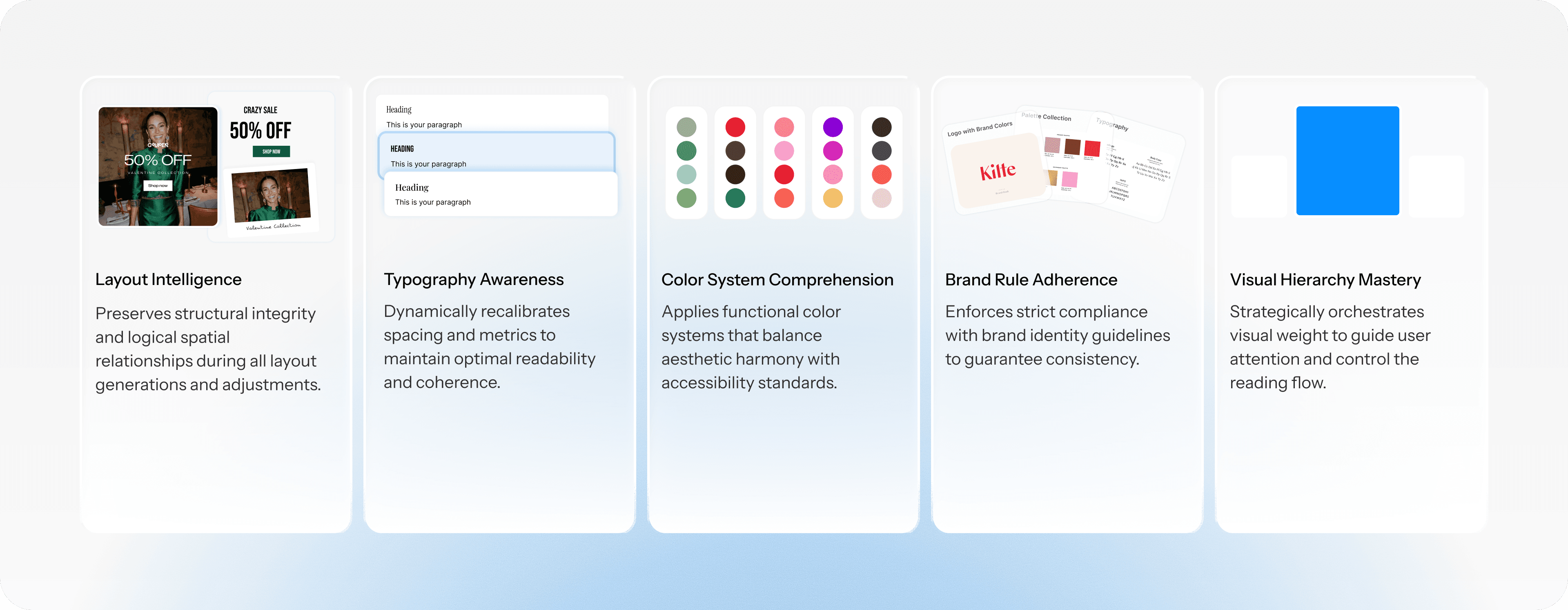
We evaluate each of these pillars through targeted generation, editing, and parameter-extraction tasks, summarized below.
Pillar | What We Measure | How We Test It |
|---|---|---|
Layout Intelligence | Are structural relationships captured and survive edits? Are design intents being met? When asked to change X, does only X change? | Generation and Iterative Editing: Guided generation, sequential modifications to test layout preservation |
Typography Awareness | Are font families, sizes, and weights identified and applied correctly? | Parameter Prediction: Quantitative extraction of font family and size |
Color System Comprehension | Are color values precise when generating, editing or analyzing layouts? | Parameter Prediction: Quantitative extraction of exact hex values |
Brand Rule Adherence | Can models learn brand rules from examples and apply them consistently? | Brand Extraction: Show examples, ask for rules, generate new on-brand work |
Visual Hierarchy Mastery | Does the output match spatial intent? Are element positions accurate? | Parameter Prediction: Bounding box extraction and IoU measurement |
Experiments
We evaluate the 5 fundamentals on the current closed sourced models - GPT-5, Gemini-3, and Sonnet 4.5 for image generation and editing. We focus on these models because they define the current production frontier for closed-source multimodal systems available to marketers.
Testing Layout Intelligence: Generation & Iterative Editing
Goal: Can current models maintain prompt adherence and handle sequential design modifications without losing structural integrity?
We started with a social media ad and asked for a series of incremental changes:
Prompt Sequence:
"Create an Instagram ad (1080×1080) for a summer sale. Big bold headline 'SUMMER SALE' at the top, '50% OFF' as a secondary callout in the middle, and a 'Shop Now' button at the bottom. Use a bright, energetic color palette with a gradient background."
"Change the headline to 'FLASH SALE'. Keep everything else exactly the same — same layout, same colors, same button position."
"Change the headline font to Macondo. Don't change anything else."
"Move the '50% OFF' callout 80 pixels higher. Keep all other elements in their exact positions."
"Increase the spacing between the headline and the callout by 40 pixels. Nothing else should move."
"Change the button background color to exactly
#FF5733. The button size, position, and text must stay identical.""Scale the entire composition down by 15% and center it, adding equal padding on all sides. Maintain all internal spacing relationships."
In the following video, you can see the results of Gemini, step-by-step:
And similarly, the results of GPT:
Both Gemini and GPT exhibit significant shortcomings in typography accuracy, edit fidelity, and prompt–visual alignment, as measured across 100 evaluated edit tasks per model in this domain.
Layout Consistency | Prompt Adherence |
|---|---|
100% | 35% |
Prompt adherence remains limited to 35% in this domain. These limitations manifest as incorrect font usage, unintended edits, or failures to execute the requested modifications.
Testing Brand Rule Adherence: Brand Extraction
Goal: Can models learn brand rules from examples and apply them consistently?
We showed models 3-5 examples of a brand's (Kilte) marketing materials and asked them to:
Identify the design rules: fonts, colors, spacing patterns, visual principles
Create a new poster in that brand's style
Input examples:

What We're Checking:
Does the model identify the actual brand fonts?
Are the color values precise?
Does it understand the spacing and layout patterns?
When generating new work, does it apply these rules, or just create something that "vibes" similarly?
The key design rules as assessed by Gemini:
Fonts:
Primary Headline in Sans Serif, urgent messages in Geometric Sans-Serif
Brand logo and high-emphasis messages in High-Contrast Serif
Colors:
Text in white or orange-red (#FF3333)
Structure:
Background: lifestyle image
Alignment: test appears in the visual center of the image
Based on the example images, and the full analysis of Gemini, it generates a new poster:

Of course, even the Kilte logo is incorrect. Signature is lost.
For brands, identity is one of the most critical aspects to maintain and communicate. Failing to preserve the style of visual assets, including fonts and color schemes, represents a significant failure. One mitigation strategy is to fine-tune models per brand; however, this approach requires repeated data curation and retraining and remains challenging for brands with limited data. An alternative is to train layer-based design models that learn relationships between assets and structural layers, whether brand-specific or generic, enabling stronger constraints and more reliable preservation of brand identity during generation.
Testing Typography, Color & Hierarchy: Parameter Prediction
Goal: Assess how accurately models can predict or maintain specific design parameters. This evaluation is necessary because a model’s ability to generate designs, collaborate with users during co-design, or apply precise edits fundamentally depends on its capacity to correctly recognize and reason about key design features and parameters. Failures at this stage directly translate into errors in downstream design generation and editing tasks.
We created 1,000 test designs with known, measurable parameters, then asked models to extract those parameters.
Parameter | Test | Metric |
|---|---|---|
Font Family (Typography) | "What is the font of this text?” | Precision: % of correct predictions |
Font Size (Typography) | "What is the font size of this text?” | L1: Average absolute difference |
Color Value (Color) | "What is the color of this text?” | L2: Euclidean distance in color space |
Component Position (Hierarchy) | "What is the bounding box of this element?” | IoU: Intersection over Union |
Component Recognition (Hierarchy) | "What element does this pixel belong to?” | IoU: Intersection over Union |
Layout Description (Hierarchy) | "What happens in this layout?” | LLM-as-Judge: A pretrained model provides quality scores |
User Intent (Hierarchy) | "What was the user intent creating this layout?” | LLM-as-Judge: A pretrained model provides quality scores |
Line Height (Typography) | "What is the line height of this text?” | L1: Average absolute difference |
Results:
Model | Font Family (Precision ↑) | Font Size (L1 ↓) | Text Color (L2 ↓) | Position (IoU ↑) | Component Recognition (IoU ↑) |
|---|---|---|---|---|---|
GPT 5 | 0.09 | 29.3 | 14.92 | 0.48 | 0.57 |
Gemini 3 | 0.15 | 67.54 | 7.2 | 0.5 | 0.54 |
Sonnet 4.5 | 0.06 | 36.02 | 12.03 | 0.38 | 0.38 |
Designer Expectation | 1.0 | 0.0 | 0.0 | 1.0 | 1.0 |
Model | Line Height (L1 ↓) | Layout Description (LLM-as-Judge ↑) | User Intent (LLM-as-Judge ↑) |
|---|---|---|---|
GPT 5 | 11.21 | 0.07 | 0.61 |
Gemini 3 | 11.86 | 0.34 | 0.57 |
Sonnet 4.5 | 205.19 | 0.73 | 0.52 |
Designer Expectation | 0.0 | 1.0 | 1.0 |
The results confirm that current models struggle to recover precise design parameters, though their failure modes differ.
Font family (Precision ↑): All models perform poorly (6–15% precision), indicating that font selection is largely guessed rather than accurately inferred.
Font size (L1 ↓) and line height (L1 ↓): Size-related parameters remain unreliable. GPT-5 shows the lowest font-size error (29.3), while Gemini-3 and Sonnet-4.5 deviate substantially. Line height is reasonable for GPT-5 and Gemini-3 (~11), but Sonnet-4.5 fails catastrophically (205), suggesting instability in fine-grained typographic control.
Text color (L2 ↓): Color prediction is the strongest parameter overall. Gemini-3 performs best (7.2), followed by Sonnet-4.5 (12.03) and GPT-5 (14.92).
Component position (IoU ↑): Layout accuracy remains limited, with IoU scores between 0.38 and 0.50, meaning element placement is only partially correct and often insufficient for pixel-sensitive design tasks.
Component recognition (IoU ↑): Moderate performance across models (0.38–0.57) suggests partial understanding of layout structure, but not robust enough for precise manipulation.
Layout description & user intent (LLM-as-Judge ↑): Sonnet-4.5 excels at semantic layout description (0.73), while GPT-5 performs poorly (0.07), highlighting a disconnect between high-level descriptive ability and geometric accuracy. User intent scores (0.52–0.61) further suggest that models have a limited understanding of how a design’s purpose should be reflected in its visual appearance.
Overall takeaway: No model performs consistently well across semantic understanding and precise parameter recovery. Strong performance on high-level intent or description does not translate into reliable, low-level design control, limiting usability for co-design and exact editing workflows.

Figure 3: Qualitative results. While GPT-5, Gemini-3, and Claude Sonnet-4.5 can predict colors that are close (though not exact), they fail more dramatically when predicting fonts and spatial positions.
What This Means for the Future
We're not trying to dunk on current AI models. They're genuinely impressive for what they were designed to do: generate novel content from open-ended prompts. The point is that design isn't an open-ended content generation problem.
Design is a constrained optimization problem. It's about working within systems, respecting rules, and making deliberate trade-offs. The models that will actually help designers aren't the ones that dream up beautiful imagery, they're the ones that understand why the logo needs 20 pixels of clear space, why the header is set in Regular weight instead of Bold, and why changing the button color from blue to green affects the entire page's visual balance.
Building those models will require:
Training data that includes design systems, not just finished designs
Architectures that preserve state across iterations, rather than regenerating from scratch
Evaluation metrics that measure structural fidelity, not just aesthetic quality
Design-specific language that treats "24px" and "Helvetica Neue Medium" as meaningful primitives
The good news? These are solvable problems. The even better news? The teams that solve them will build tools that designers actually want to use. Not because AI is trendy, but because it genuinely makes their work better.
Stay tuned for our full experimental results in an upcoming technical report, featuring comprehensive benchmarking across public and private datasets on layout understanding and generation tasks, evaluated on both closed-source and open-source models.
tl;dr Current AI models excel at generating artistic imagery but fail at basic professional design tasks, like moving a logo or swapping a font, because they "redraw" entire images rather than preserving existing structure. This limitation stems from treating design as pixel prediction rather than a system of strict rules involving layout, typography, and brand identity. To create a true design co-pilot, we must build models that master core design pillars, enabling precise generation and iterative editing.
"A designer at Airbnb needs to update 50 ad variations. Change one color. Should take 5 minutes. With current AI tools, it takes 4 hours of manual work."
There’s a strange paradox in today’s Creative AI landscape. Give GPT-5 or Gemini a prompt like “generate a cyberpunk cityscape at sunset,” and you’ll get something genuinely impressive. Moody lighting, intricate detail, the works.
But ask that same model to take an existing graphic, a presentation slide, an ad, a landing page, and make a precise design edit: make the headline bigger, keep the layout identical, shift an element by two pixels, swap blue for our brand orange, or use a custom font.
Everything breaks.
Tasks that were trivial in yesterday’s design workflows suddenly become impossible for today’s most advanced models?

Figure 1: When asked to generate an image of a cyberpunk cityscape at sunset, Gemini produces a visually stunning result (left). However, when given a simple landscape poster featuring the Patagonia logo and instructed to move the logo upward, it fails to perform the requested edit, instead copying and downscaling the text (right).
The Mismatch Between Diffusion Models and Graphic Design
Current models treat design as a one-shot art generation problem, not as the collaborative, iterative craft it actually is. Design is in the iterations.
Pixel-level models see a flat image. Structure-aware models see the decisions that created it - and can make new decisions that honor the same principles. That's the difference between a tool that generates pretty pictures and a copilot that understands design intent.
The assumption of treating graphic design as scene generation has two fundamental problems:
Hard Constraints - First, they cannot enforce hard design constraints, even when those constraints are simple. If a designer wants a specific font, exact typography, or a fixed text layer, diffusion models can only approximate it. The output may look similar, but the rule itself is never enforced.
Constraints such as “use this font” or “do not regenerate this layer” are currently treated as probabilistic instructions rather than hard rules. Models that represent structure and layers can instead enforce these constraints exactly, by freezing components or applying precise vector edits (e.g., aligning text boxes) without regenerating the full image. This yields more reliable control while reducing computation, latency, and cost.
Redrawing vs. Editing - Second, editing becomes guided regeneration. Instead of modifying a specific element, the model redraws the entire design. Layout, hierarchy, spacing, and typography are re-inferred rather than preserved, making precise edits impossible.

Figure 2: When instructed to change the title, the diffusion model (top) redraws the entire canvas, often introducing undesired artifacts like changing a logo to suit the new text, whereas the design model (bottom) treats the request as a structural edit, separately editing the relevant layer and preserving the original typography and layout exactly.
Fundamentals of Design Pillars
If we want to build a AI Design co-pilot, we need models that understand design language. Not natural language that happens to describe design, but the actual vocabulary and rules that govern how visual communication works.
To rigorously evaluate a model’s design sense, we decompose it into five fundamental pillars. These five pillars capture the irreducible, non-overlapping capabilities required for professional design, making design sense measurable beyond surface-level aesthetics.

We evaluate each of these pillars through targeted generation, editing, and parameter-extraction tasks, summarized below.
Pillar | What We Measure | How We Test It |
|---|---|---|
Layout Intelligence | Are structural relationships captured and survive edits? Are design intents being met? When asked to change X, does only X change? | Generation and Iterative Editing: Guided generation, sequential modifications to test layout preservation |
Typography Awareness | Are font families, sizes, and weights identified and applied correctly? | Parameter Prediction: Quantitative extraction of font family and size |
Color System Comprehension | Are color values precise when generating, editing or analyzing layouts? | Parameter Prediction: Quantitative extraction of exact hex values |
Brand Rule Adherence | Can models learn brand rules from examples and apply them consistently? | Brand Extraction: Show examples, ask for rules, generate new on-brand work |
Visual Hierarchy Mastery | Does the output match spatial intent? Are element positions accurate? | Parameter Prediction: Bounding box extraction and IoU measurement |
Experiments
We evaluate the 5 fundamentals on the current closed sourced models - GPT-5, Gemini-3, and Sonnet 4.5 for image generation and editing. We focus on these models because they define the current production frontier for closed-source multimodal systems available to marketers.
Testing Layout Intelligence: Generation & Iterative Editing
Goal: Can current models maintain prompt adherence and handle sequential design modifications without losing structural integrity?
We started with a social media ad and asked for a series of incremental changes:
Prompt Sequence:
"Create an Instagram ad (1080×1080) for a summer sale. Big bold headline 'SUMMER SALE' at the top, '50% OFF' as a secondary callout in the middle, and a 'Shop Now' button at the bottom. Use a bright, energetic color palette with a gradient background."
"Change the headline to 'FLASH SALE'. Keep everything else exactly the same — same layout, same colors, same button position."
"Change the headline font to Macondo. Don't change anything else."
"Move the '50% OFF' callout 80 pixels higher. Keep all other elements in their exact positions."
"Increase the spacing between the headline and the callout by 40 pixels. Nothing else should move."
"Change the button background color to exactly
#FF5733. The button size, position, and text must stay identical.""Scale the entire composition down by 15% and center it, adding equal padding on all sides. Maintain all internal spacing relationships."
In the following video, you can see the results of Gemini, step-by-step:
And similarly, the results of GPT:
Both Gemini and GPT exhibit significant shortcomings in typography accuracy, edit fidelity, and prompt–visual alignment, as measured across 100 evaluated edit tasks per model in this domain.
Layout Consistency | Prompt Adherence |
|---|---|
100% | 35% |
Prompt adherence remains limited to 35% in this domain. These limitations manifest as incorrect font usage, unintended edits, or failures to execute the requested modifications.
Testing Brand Rule Adherence: Brand Extraction
Goal: Can models learn brand rules from examples and apply them consistently?
We showed models 3-5 examples of a brand's (Kilte) marketing materials and asked them to:
Identify the design rules: fonts, colors, spacing patterns, visual principles
Create a new poster in that brand's style
Input examples:

What We're Checking:
Does the model identify the actual brand fonts?
Are the color values precise?
Does it understand the spacing and layout patterns?
When generating new work, does it apply these rules, or just create something that "vibes" similarly?
The key design rules as assessed by Gemini:
Fonts:
Primary Headline in Sans Serif, urgent messages in Geometric Sans-Serif
Brand logo and high-emphasis messages in High-Contrast Serif
Colors:
Text in white or orange-red (#FF3333)
Structure:
Background: lifestyle image
Alignment: test appears in the visual center of the image
Based on the example images, and the full analysis of Gemini, it generates a new poster:

Of course, even the Kilte logo is incorrect. Signature is lost.
For brands, identity is one of the most critical aspects to maintain and communicate. Failing to preserve the style of visual assets, including fonts and color schemes, represents a significant failure. One mitigation strategy is to fine-tune models per brand; however, this approach requires repeated data curation and retraining and remains challenging for brands with limited data. An alternative is to train layer-based design models that learn relationships between assets and structural layers, whether brand-specific or generic, enabling stronger constraints and more reliable preservation of brand identity during generation.
Testing Typography, Color & Hierarchy: Parameter Prediction
Goal: Assess how accurately models can predict or maintain specific design parameters. This evaluation is necessary because a model’s ability to generate designs, collaborate with users during co-design, or apply precise edits fundamentally depends on its capacity to correctly recognize and reason about key design features and parameters. Failures at this stage directly translate into errors in downstream design generation and editing tasks.
We created 1,000 test designs with known, measurable parameters, then asked models to extract those parameters.
Parameter | Test | Metric |
|---|---|---|
Font Family (Typography) | "What is the font of this text?” | Precision: % of correct predictions |
Font Size (Typography) | "What is the font size of this text?” | L1: Average absolute difference |
Color Value (Color) | "What is the color of this text?” | L2: Euclidean distance in color space |
Component Position (Hierarchy) | "What is the bounding box of this element?” | IoU: Intersection over Union |
Component Recognition (Hierarchy) | "What element does this pixel belong to?” | IoU: Intersection over Union |
Layout Description (Hierarchy) | "What happens in this layout?” | LLM-as-Judge: A pretrained model provides quality scores |
User Intent (Hierarchy) | "What was the user intent creating this layout?” | LLM-as-Judge: A pretrained model provides quality scores |
Line Height (Typography) | "What is the line height of this text?” | L1: Average absolute difference |
Results:
Model | Font Family (Precision ↑) | Font Size (L1 ↓) | Text Color (L2 ↓) | Position (IoU ↑) | Component Recognition (IoU ↑) |
|---|---|---|---|---|---|
GPT 5 | 0.09 | 29.3 | 14.92 | 0.48 | 0.57 |
Gemini 3 | 0.15 | 67.54 | 7.2 | 0.5 | 0.54 |
Sonnet 4.5 | 0.06 | 36.02 | 12.03 | 0.38 | 0.38 |
Designer Expectation | 1.0 | 0.0 | 0.0 | 1.0 | 1.0 |
Model | Line Height (L1 ↓) | Layout Description (LLM-as-Judge ↑) | User Intent (LLM-as-Judge ↑) |
|---|---|---|---|
GPT 5 | 11.21 | 0.07 | 0.61 |
Gemini 3 | 11.86 | 0.34 | 0.57 |
Sonnet 4.5 | 205.19 | 0.73 | 0.52 |
Designer Expectation | 0.0 | 1.0 | 1.0 |
The results confirm that current models struggle to recover precise design parameters, though their failure modes differ.
Font family (Precision ↑): All models perform poorly (6–15% precision), indicating that font selection is largely guessed rather than accurately inferred.
Font size (L1 ↓) and line height (L1 ↓): Size-related parameters remain unreliable. GPT-5 shows the lowest font-size error (29.3), while Gemini-3 and Sonnet-4.5 deviate substantially. Line height is reasonable for GPT-5 and Gemini-3 (~11), but Sonnet-4.5 fails catastrophically (205), suggesting instability in fine-grained typographic control.
Text color (L2 ↓): Color prediction is the strongest parameter overall. Gemini-3 performs best (7.2), followed by Sonnet-4.5 (12.03) and GPT-5 (14.92).
Component position (IoU ↑): Layout accuracy remains limited, with IoU scores between 0.38 and 0.50, meaning element placement is only partially correct and often insufficient for pixel-sensitive design tasks.
Component recognition (IoU ↑): Moderate performance across models (0.38–0.57) suggests partial understanding of layout structure, but not robust enough for precise manipulation.
Layout description & user intent (LLM-as-Judge ↑): Sonnet-4.5 excels at semantic layout description (0.73), while GPT-5 performs poorly (0.07), highlighting a disconnect between high-level descriptive ability and geometric accuracy. User intent scores (0.52–0.61) further suggest that models have a limited understanding of how a design’s purpose should be reflected in its visual appearance.
Overall takeaway: No model performs consistently well across semantic understanding and precise parameter recovery. Strong performance on high-level intent or description does not translate into reliable, low-level design control, limiting usability for co-design and exact editing workflows.

Figure 3: Qualitative results. While GPT-5, Gemini-3, and Claude Sonnet-4.5 can predict colors that are close (though not exact), they fail more dramatically when predicting fonts and spatial positions.
What This Means for the Future
We're not trying to dunk on current AI models. They're genuinely impressive for what they were designed to do: generate novel content from open-ended prompts. The point is that design isn't an open-ended content generation problem.
Design is a constrained optimization problem. It's about working within systems, respecting rules, and making deliberate trade-offs. The models that will actually help designers aren't the ones that dream up beautiful imagery, they're the ones that understand why the logo needs 20 pixels of clear space, why the header is set in Regular weight instead of Bold, and why changing the button color from blue to green affects the entire page's visual balance.
Building those models will require:
Training data that includes design systems, not just finished designs
Architectures that preserve state across iterations, rather than regenerating from scratch
Evaluation metrics that measure structural fidelity, not just aesthetic quality
Design-specific language that treats "24px" and "Helvetica Neue Medium" as meaningful primitives
The good news? These are solvable problems. The even better news? The teams that solve them will build tools that designers actually want to use. Not because AI is trendy, but because it genuinely makes their work better.
Stay tuned for our full experimental results in an upcoming technical report, featuring comprehensive benchmarking across public and private datasets on layout understanding and generation tasks, evaluated on both closed-source and open-source models.
tl;dr Current AI models excel at generating artistic imagery but fail at basic professional design tasks, like moving a logo or swapping a font, because they "redraw" entire images rather than preserving existing structure. This limitation stems from treating design as pixel prediction rather than a system of strict rules involving layout, typography, and brand identity. To create a true design co-pilot, we must build models that master core design pillars, enabling precise generation and iterative editing.
"A designer at Airbnb needs to update 50 ad variations. Change one color. Should take 5 minutes. With current AI tools, it takes 4 hours of manual work."
There’s a strange paradox in today’s Creative AI landscape. Give GPT-5 or Gemini a prompt like “generate a cyberpunk cityscape at sunset,” and you’ll get something genuinely impressive. Moody lighting, intricate detail, the works.
But ask that same model to take an existing graphic, a presentation slide, an ad, a landing page, and make a precise design edit: make the headline bigger, keep the layout identical, shift an element by two pixels, swap blue for our brand orange, or use a custom font.
Everything breaks.
Tasks that were trivial in yesterday’s design workflows suddenly become impossible for today’s most advanced models?

Figure 1: When asked to generate an image of a cyberpunk cityscape at sunset, Gemini produces a visually stunning result (left). However, when given a simple landscape poster featuring the Patagonia logo and instructed to move the logo upward, it fails to perform the requested edit, instead copying and downscaling the text (right).
The Mismatch Between Diffusion Models and Graphic Design
Current models treat design as a one-shot art generation problem, not as the collaborative, iterative craft it actually is. Design is in the iterations.
Pixel-level models see a flat image. Structure-aware models see the decisions that created it - and can make new decisions that honor the same principles. That's the difference between a tool that generates pretty pictures and a copilot that understands design intent.
The assumption of treating graphic design as scene generation has two fundamental problems:
Hard Constraints - First, they cannot enforce hard design constraints, even when those constraints are simple. If a designer wants a specific font, exact typography, or a fixed text layer, diffusion models can only approximate it. The output may look similar, but the rule itself is never enforced.
Constraints such as “use this font” or “do not regenerate this layer” are currently treated as probabilistic instructions rather than hard rules. Models that represent structure and layers can instead enforce these constraints exactly, by freezing components or applying precise vector edits (e.g., aligning text boxes) without regenerating the full image. This yields more reliable control while reducing computation, latency, and cost.
Redrawing vs. Editing - Second, editing becomes guided regeneration. Instead of modifying a specific element, the model redraws the entire design. Layout, hierarchy, spacing, and typography are re-inferred rather than preserved, making precise edits impossible.

Figure 2: When instructed to change the title, the diffusion model (top) redraws the entire canvas, often introducing undesired artifacts like changing a logo to suit the new text, whereas the design model (bottom) treats the request as a structural edit, separately editing the relevant layer and preserving the original typography and layout exactly.
Fundamentals of Design Pillars
If we want to build a AI Design co-pilot, we need models that understand design language. Not natural language that happens to describe design, but the actual vocabulary and rules that govern how visual communication works.
To rigorously evaluate a model’s design sense, we decompose it into five fundamental pillars. These five pillars capture the irreducible, non-overlapping capabilities required for professional design, making design sense measurable beyond surface-level aesthetics.

We evaluate each of these pillars through targeted generation, editing, and parameter-extraction tasks, summarized below.
Pillar | What We Measure | How We Test It |
|---|---|---|
Layout Intelligence | Are structural relationships captured and survive edits? Are design intents being met? When asked to change X, does only X change? | Generation and Iterative Editing: Guided generation, sequential modifications to test layout preservation |
Typography Awareness | Are font families, sizes, and weights identified and applied correctly? | Parameter Prediction: Quantitative extraction of font family and size |
Color System Comprehension | Are color values precise when generating, editing or analyzing layouts? | Parameter Prediction: Quantitative extraction of exact hex values |
Brand Rule Adherence | Can models learn brand rules from examples and apply them consistently? | Brand Extraction: Show examples, ask for rules, generate new on-brand work |
Visual Hierarchy Mastery | Does the output match spatial intent? Are element positions accurate? | Parameter Prediction: Bounding box extraction and IoU measurement |
Experiments
We evaluate the 5 fundamentals on the current closed sourced models - GPT-5, Gemini-3, and Sonnet 4.5 for image generation and editing. We focus on these models because they define the current production frontier for closed-source multimodal systems available to marketers.
Testing Layout Intelligence: Generation & Iterative Editing
Goal: Can current models maintain prompt adherence and handle sequential design modifications without losing structural integrity?
We started with a social media ad and asked for a series of incremental changes:
Prompt Sequence:
"Create an Instagram ad (1080×1080) for a summer sale. Big bold headline 'SUMMER SALE' at the top, '50% OFF' as a secondary callout in the middle, and a 'Shop Now' button at the bottom. Use a bright, energetic color palette with a gradient background."
"Change the headline to 'FLASH SALE'. Keep everything else exactly the same — same layout, same colors, same button position."
"Change the headline font to Macondo. Don't change anything else."
"Move the '50% OFF' callout 80 pixels higher. Keep all other elements in their exact positions."
"Increase the spacing between the headline and the callout by 40 pixels. Nothing else should move."
"Change the button background color to exactly
#FF5733. The button size, position, and text must stay identical.""Scale the entire composition down by 15% and center it, adding equal padding on all sides. Maintain all internal spacing relationships."
In the following video, you can see the results of Gemini, step-by-step:
And similarly, the results of GPT:
Both Gemini and GPT exhibit significant shortcomings in typography accuracy, edit fidelity, and prompt–visual alignment, as measured across 100 evaluated edit tasks per model in this domain.
Layout Consistency | Prompt Adherence |
|---|---|
100% | 35% |
Prompt adherence remains limited to 35% in this domain. These limitations manifest as incorrect font usage, unintended edits, or failures to execute the requested modifications.
Testing Brand Rule Adherence: Brand Extraction
Goal: Can models learn brand rules from examples and apply them consistently?
We showed models 3-5 examples of a brand's (Kilte) marketing materials and asked them to:
Identify the design rules: fonts, colors, spacing patterns, visual principles
Create a new poster in that brand's style
Input examples:

What We're Checking:
Does the model identify the actual brand fonts?
Are the color values precise?
Does it understand the spacing and layout patterns?
When generating new work, does it apply these rules, or just create something that "vibes" similarly?
The key design rules as assessed by Gemini:
Fonts:
Primary Headline in Sans Serif, urgent messages in Geometric Sans-Serif
Brand logo and high-emphasis messages in High-Contrast Serif
Colors:
Text in white or orange-red (#FF3333)
Structure:
Background: lifestyle image
Alignment: test appears in the visual center of the image
Based on the example images, and the full analysis of Gemini, it generates a new poster:

Of course, even the Kilte logo is incorrect. Signature is lost.
For brands, identity is one of the most critical aspects to maintain and communicate. Failing to preserve the style of visual assets, including fonts and color schemes, represents a significant failure. One mitigation strategy is to fine-tune models per brand; however, this approach requires repeated data curation and retraining and remains challenging for brands with limited data. An alternative is to train layer-based design models that learn relationships between assets and structural layers, whether brand-specific or generic, enabling stronger constraints and more reliable preservation of brand identity during generation.
Testing Typography, Color & Hierarchy: Parameter Prediction
Goal: Assess how accurately models can predict or maintain specific design parameters. This evaluation is necessary because a model’s ability to generate designs, collaborate with users during co-design, or apply precise edits fundamentally depends on its capacity to correctly recognize and reason about key design features and parameters. Failures at this stage directly translate into errors in downstream design generation and editing tasks.
We created 1,000 test designs with known, measurable parameters, then asked models to extract those parameters.
Parameter | Test | Metric |
|---|---|---|
Font Family (Typography) | "What is the font of this text?” | Precision: % of correct predictions |
Font Size (Typography) | "What is the font size of this text?” | L1: Average absolute difference |
Color Value (Color) | "What is the color of this text?” | L2: Euclidean distance in color space |
Component Position (Hierarchy) | "What is the bounding box of this element?” | IoU: Intersection over Union |
Component Recognition (Hierarchy) | "What element does this pixel belong to?” | IoU: Intersection over Union |
Layout Description (Hierarchy) | "What happens in this layout?” | LLM-as-Judge: A pretrained model provides quality scores |
User Intent (Hierarchy) | "What was the user intent creating this layout?” | LLM-as-Judge: A pretrained model provides quality scores |
Line Height (Typography) | "What is the line height of this text?” | L1: Average absolute difference |
Results:
Model | Font Family (Precision ↑) | Font Size (L1 ↓) | Text Color (L2 ↓) | Position (IoU ↑) | Component Recognition (IoU ↑) |
|---|---|---|---|---|---|
GPT 5 | 0.09 | 29.3 | 14.92 | 0.48 | 0.57 |
Gemini 3 | 0.15 | 67.54 | 7.2 | 0.5 | 0.54 |
Sonnet 4.5 | 0.06 | 36.02 | 12.03 | 0.38 | 0.38 |
Designer Expectation | 1.0 | 0.0 | 0.0 | 1.0 | 1.0 |
Model | Line Height (L1 ↓) | Layout Description (LLM-as-Judge ↑) | User Intent (LLM-as-Judge ↑) |
|---|---|---|---|
GPT 5 | 11.21 | 0.07 | 0.61 |
Gemini 3 | 11.86 | 0.34 | 0.57 |
Sonnet 4.5 | 205.19 | 0.73 | 0.52 |
Designer Expectation | 0.0 | 1.0 | 1.0 |
The results confirm that current models struggle to recover precise design parameters, though their failure modes differ.
Font family (Precision ↑): All models perform poorly (6–15% precision), indicating that font selection is largely guessed rather than accurately inferred.
Font size (L1 ↓) and line height (L1 ↓): Size-related parameters remain unreliable. GPT-5 shows the lowest font-size error (29.3), while Gemini-3 and Sonnet-4.5 deviate substantially. Line height is reasonable for GPT-5 and Gemini-3 (~11), but Sonnet-4.5 fails catastrophically (205), suggesting instability in fine-grained typographic control.
Text color (L2 ↓): Color prediction is the strongest parameter overall. Gemini-3 performs best (7.2), followed by Sonnet-4.5 (12.03) and GPT-5 (14.92).
Component position (IoU ↑): Layout accuracy remains limited, with IoU scores between 0.38 and 0.50, meaning element placement is only partially correct and often insufficient for pixel-sensitive design tasks.
Component recognition (IoU ↑): Moderate performance across models (0.38–0.57) suggests partial understanding of layout structure, but not robust enough for precise manipulation.
Layout description & user intent (LLM-as-Judge ↑): Sonnet-4.5 excels at semantic layout description (0.73), while GPT-5 performs poorly (0.07), highlighting a disconnect between high-level descriptive ability and geometric accuracy. User intent scores (0.52–0.61) further suggest that models have a limited understanding of how a design’s purpose should be reflected in its visual appearance.
Overall takeaway: No model performs consistently well across semantic understanding and precise parameter recovery. Strong performance on high-level intent or description does not translate into reliable, low-level design control, limiting usability for co-design and exact editing workflows.

Figure 3: Qualitative results. While GPT-5, Gemini-3, and Claude Sonnet-4.5 can predict colors that are close (though not exact), they fail more dramatically when predicting fonts and spatial positions.
What This Means for the Future
We're not trying to dunk on current AI models. They're genuinely impressive for what they were designed to do: generate novel content from open-ended prompts. The point is that design isn't an open-ended content generation problem.
Design is a constrained optimization problem. It's about working within systems, respecting rules, and making deliberate trade-offs. The models that will actually help designers aren't the ones that dream up beautiful imagery, they're the ones that understand why the logo needs 20 pixels of clear space, why the header is set in Regular weight instead of Bold, and why changing the button color from blue to green affects the entire page's visual balance.
Building those models will require:
Training data that includes design systems, not just finished designs
Architectures that preserve state across iterations, rather than regenerating from scratch
Evaluation metrics that measure structural fidelity, not just aesthetic quality
Design-specific language that treats "24px" and "Helvetica Neue Medium" as meaningful primitives
The good news? These are solvable problems. The even better news? The teams that solve them will build tools that designers actually want to use. Not because AI is trendy, but because it genuinely makes their work better.
Stay tuned for our full experimental results in an upcoming technical report, featuring comprehensive benchmarking across public and private datasets on layout understanding and generation tasks, evaluated on both closed-source and open-source models.